 FuelMetric Pro
User guide · Chapter 6 of 8
Backup and moving to a new PC
Keep a backup file and move your data to another PC or phone.
Your data stays on your PC or phone; nothing is stored on our servers. A backup file is the way to keep it safe and to move it.
Back up
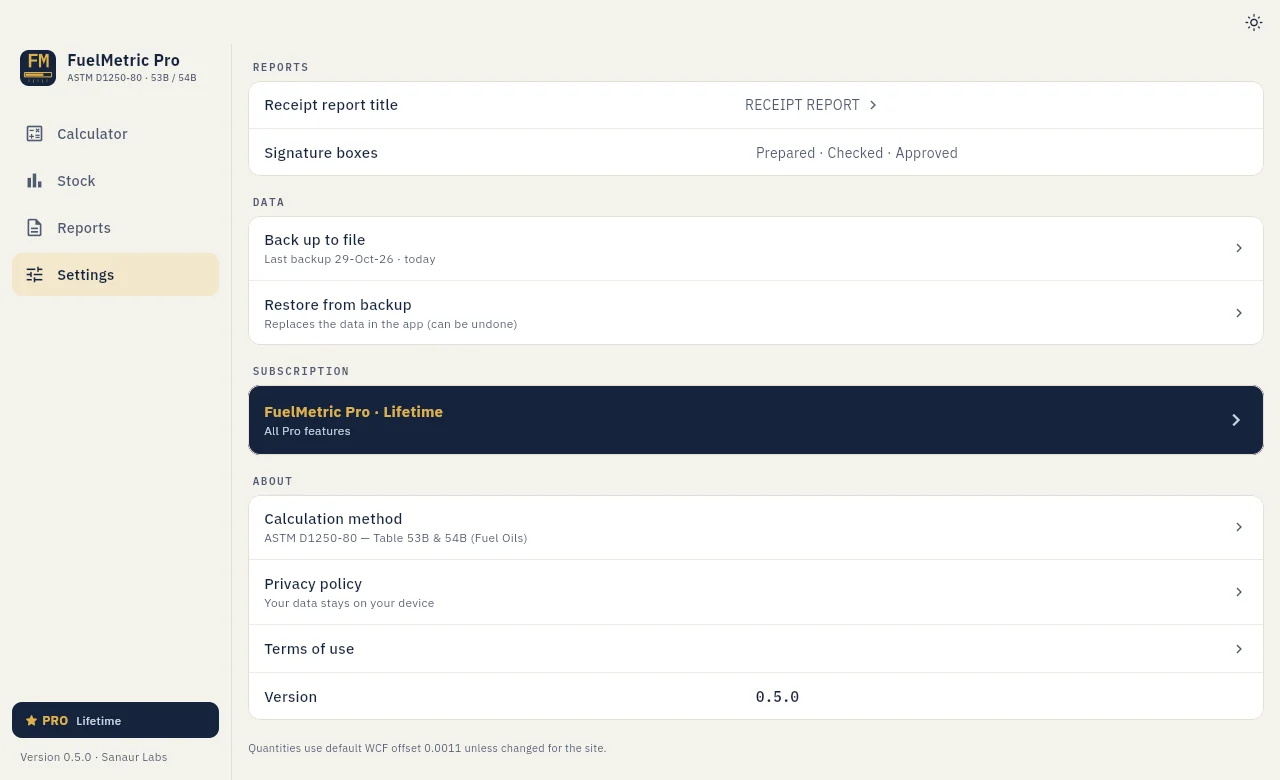
Open Settings › Data › Back up to file. The app saves a file named like FuelMetric_Backup_29-Oct-26.fmbak. Keep a copy away from the PC, for example in Google Drive or email. Settings shows the date of the last backup and reminds you when it is more than 7 days old.
Restore
Choose Restore from backup and select the file. The app shows what the backup holds (date, company, site, tanks, readings, receipts) before anything changes. Restoring replaces the data in the app. Undo last restore takes the app back to the data from before the restore, once.
Move to a new PC
- On the old PC, make a backup file.
- If you have Pro, open Upgrade (or Your plan) and choose Deactivate on this PC.
- Install FuelMetric Pro on the new PC, restore the backup and enter your licence key.
On Windows the data is kept in %APPDATA%\Sanaur Labs\FuelMetric Pro; uninstalling the app does not delete it.